To create a simple Hello World form application in C++ for Ubuntu is not so difficult task
First we need to write the code bellow in a hello_world.cpp file
Here is an example of code in C++
#include <gtk/gtk.h>
void on_button1_clicked(GtkButton *button, gpointer data)
{
g_print(“Hello World by C++\n”);
}
void on_button2_clicked(GtkButton *button, gpointer data)
{
gtk_main_quit();
}
int main(int argc, char *argv[])
{
gtk_init(&argc, &argv);
GtkWidget *window = gtk_window_new(GTK_WINDOW_TOPLEVEL);
gtk_window_set_title(GTK_WINDOW(window), “Hello World Application”);
gtk_container_set_border_width(GTK_CONTAINER(window), 10);
GtkWidget *grid = gtk_grid_new();
gtk_container_add(GTK_CONTAINER(window), grid);
GtkWidget *label = gtk_label_new(“Click a button to say hello”);
gtk_grid_attach(GTK_GRID(grid), label, 0, 0, 1, 1);
GtkWidget *button1 = gtk_button_new_with_label(“Say Hello”);
gtk_grid_attach(GTK_GRID(grid), button1, 0, 1, 1, 1);
g_signal_connect(button1, “clicked”, G_CALLBACK(on_button1_clicked), NULL);
GtkWidget *button2 = gtk_button_new_with_label(“Quit”);
gtk_grid_attach(GTK_GRID(grid), button2, 0, 2, 1, 1);
g_signal_connect(button2, “clicked”, G_CALLBACK(on_button2_clicked), NULL);
gtk_widget_show_all(window);
gtk_main();
return 0;
}
after that we need to install libgtk-3-dev by typing in a terminal (ctrl + alt + t -> to open a terminal in ubuntu)
sudo apt-get install libgtk-3-dev
To build the application we run in the same terminal the command
g++ -o hello_world hello_world.cpp `pkg-config –cflags –libs gtk+-3.0`
After that we run the application
./hello_world
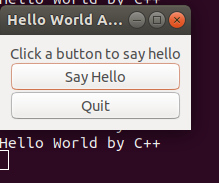
You should see a form with 2 buttons and one label. By clicking the first button you have to see the message in the terminal